 Datemaster

 Español
 Français
 Português
 Deutsch
 Italiano
 日本語
日本語 简体中文
简体中文 한국어
한국어 Русский
Works with any file
Photos, videos, documents, anything. Change when a file was created, when it was last modified, or both.
Pick a date, drop your files, and you're done. Datemaster changes the created and modified dates your Mac shows, and the dates saved inside PDF and Office documents too.
Download for Mac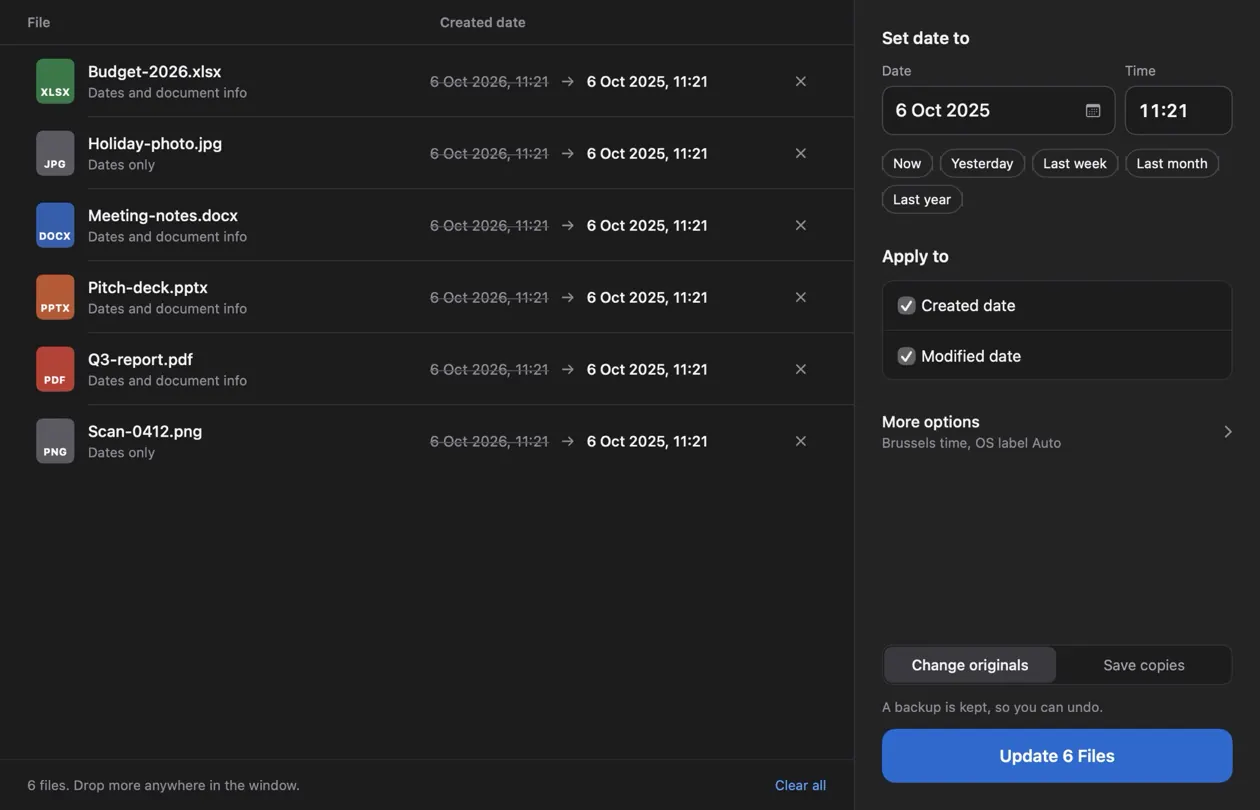
Photos, videos, documents, anything. Change when a file was created, when it was last modified, or both.
PDF, Word, Excel and PowerPoint files also keep dates inside them. Datemaster updates those as well, so everything matches.
A backup of every file is kept before it changes. Changed your mind? One click puts everything back.
Your files never leave your Mac. No account, no internet connection, no tracking.
Drag them onto the window, or click Choose Files.
Type it, use the calendar, or tap a shortcut like Last month.
Every file gets its new date. You see the result right away.
Free for Mac. Version 1.0.0.
Download for MacOpen Datemaster, drop the file on the window, pick the new date and click Update. Finder can't edit these dates, and Datemaster does it without Terminal commands or developer tools.
Yes. For PDF, Word (.docx), Excel (.xlsx) and PowerPoint (.pptx) files it also updates the created and modified dates stored inside the document, so the file and its contents agree.
Yes. No trial, no subscription, no account.
Yes. Choose Save copies and Datemaster makes changed copies next to your files, leaving the originals as they are.
The app isn't notarized by Apple yet, so macOS asks you to confirm once. The steps are under Installing above.
Digitally signed or password-protected documents keep their contents untouched. Datemaster tells you which ones and can still change the dates your Mac shows for them.